
19 WordPress plugins found
'%20fill-rule='evenodd'%20clip-rule='evenodd'%20d='M6.66675%205.49996C6.29856%205.49996%206.00008%205.79844%206.00008%206.16663V12.8333C6.00008%2013.2015%206.29856%2013.5%206.66675%2013.5H13.3334C13.7016%2013.5%2014.0001%2013.2015%2014.0001%2012.8333V6.16663C14.0001%205.79844%2013.7016%205.49996%2013.3334%205.49996H6.66675ZM4.66675%206.16663C4.66675%205.06206%205.56218%204.16663%206.66675%204.16663H13.3334C14.438%204.16663%2015.3334%205.06206%2015.3334%206.16663V12.8333C15.3334%2013.9379%2014.438%2014.8333%2013.3334%2014.8333H6.66675C5.56218%2014.8333%204.66675%2013.9379%204.66675%2012.8333V6.16663Z'%20fill='%235A626D'/%3e%3cpath%20id='Vector%20(Stroke)_2'%20fill-rule='evenodd'%20clip-rule='evenodd'%20d='M2.66675%201.49996C2.3016%201.49996%202.00008%201.80148%202.00008%202.16663V8.83329C2.00008%209.19844%202.3016%209.49996%202.66675%209.49996C3.03494%209.49996%203.33341%209.79844%203.33341%2010.1666C3.33341%2010.5348%203.03494%2010.8333%202.66675%2010.8333C1.56522%2010.8333%200.666748%209.93482%200.666748%208.83329V2.16663C0.666748%201.0651%201.56522%200.166626%202.66675%200.166626H9.33341C10.4349%200.166626%2011.3334%201.0651%2011.3334%202.16663C11.3334%202.53482%2011.0349%202.83329%2010.6667%202.83329C10.2986%202.83329%2010.0001%202.53482%2010.0001%202.16663C10.0001%201.80148%209.69856%201.49996%209.33341%201.49996H2.66675Z'%20fill='%235A626D'/%3e%3c/g%3e%3c/svg%3e) Copy link
Copy link Share
Share Sort By
WP Statistics – Simple, privacy-friendly Google Analytics alternative
Discover GDPR-compliant analytics with WP Statistics, the top choice for WordPress users seeking an alternative to Google Analytics. No external accounts, unlimited visitor tracking, and full data ownership—all stored directly in your WordPress database.
Checkout Demo | View Screenshots
GDPR Compliant (Data Privacy)
WP Statistics is GDPR, CCPA, PECR, and cookie compliance by default.
- We do not use cookies
- We do not store personally identifiable information (PII) by default
- 100% data ownership. Data is entirely created and stored on your server
- Enhance IP Hashing with Random Daily Salt Mechanism
- Features to export and delete data for GDPR
- Respect for User Privacy with Do Not Track (DNT)
- Privacy Audit Tool for compliance with privacy laws
Your site won’t need to have a cookie popup since WP Statistics uses cookie-less tracking.
You can find more information in “What we collect“.
Top Features
- Fully integrate with your WordPress and your content structure and you have the all reports all in your WP dashboard
- Content and Category Analytics: Track performance based on your site’s content and categories.
- Simple analytics dashboard
- Super easy to install. No coding or technical knowledge needed
- Advanced data privacy settings that are customizable to fit your needs, in compliance with diverse data protection laws
- Track URL parameters, including UTMs, for campaign analysis
- With configurable settings, manage large amounts of data on high-traffic websites
- Monitor live online user traffic in real-time
- Fully customized overview dashboard page
- Shows your most popular posts and pages
- Referrals Tracking: Track and analyze referrals with five reports: Referred Visitors, Referrers, Search Engines, Social Media, and Source Categories. The new Source Categories report includes support for Organic Search, Paid Search, Organic Social, Paid Social, and more.
- Lists your top referral sources such as search engines
- Author Analytics: Measures author performance.
- Geographic Reports: Location-based analytics, including countries, cities, European countries, US states, and regions within your country.
- Devices Report: Detailed device-specific analytics covering browsers, operating systems, device categories and device models.
- Bypass Ad Blockers: Dynamically load the tracking script with a unique name and address to bypass ad blockers.
- Integrate with WP Consent API: Ensures compatibility with consent plugins like Complianz and Cookiebot.
- Email reports with customizable content
- Customize role-based access to view analytics and modify settings.
- Advanced Filtering & Exceptions: By user roles, IPs, countries, URLs, and more.
- Premium Add-on: Data Plus
- Custom Post Type Tracking: DataPlus extends WP Statistics’ tracking to include all custom post types in addition to Posts and Pages.
- Custom Taxonomy Analytics: In addition to monitoring default taxonomies like Categories and Tags, DataPlus also tracks custom taxonomies.
- Link Tracker: Find out which outbound links your audience clicks on, giving you insights into their preferences and behaviors.
- Download Tracker: Keep track of what’s being downloaded, who’s downloading it, and when.
- Individual Author Performance: Detailed metrics on the performance of individual authors.
- Detailed Analytics for Each Country: In-depth analytics for each country to enhance geographical reporting.
- And more!
- Premium Add-on: Marketing
- Campaign Analytics: Track UTM-tagged links and see which campaigns drive the most visitors.
- Google Search Console Integration: Monitor impressions, clicks, and queries.
- Custom Event Tracking: Create goals based on clicks, pageviews, or events and monitor conversions.
- Built-in UTM Link Builder: Generate and validate campaign URLs inside your dashboard.
Get the most out of your website analytics by using WP Statistics Premium Add-ons
Upgrade your analytics toolkit with our range of premium add-ons, including Data Plus, Advanced Reporting, Real-Time Stats, Mini Chart, Marketing, and more. Making informed decisions is easier with these powerful tools.
Special Offer: Save up to 60% on all premium features when you purchase WP Statistics Premium.
Report Bugs
Having trouble with a bug? Please create an issue on GitHub. Kindly note that GitHub is exclusively for bug reports; other inquiries will be closed.
For security vulnerabilities, please report them through the Patchstack Vulnerability Disclosure Program. The Patchstack team will validate, triage, and handle any security issues.

 A month ago
'%3e%3cpath%20id='Vector'%20d='M20%2010C20%204.49%2015.51%200%2010%200C4.48%200%200%204.49%200%2010C0%2015.52%204.48%2020%2010%2020C15.51%2020%2020%2015.52%2020%2010ZM7.78%2015.37L4.37%206.22C4.92%206.2%205.54%206.14%205.54%206.14C6.04%206.08%205.98%205.01%205.48%205.03C5.48%205.03%204.03%205.14%203.11%205.14C2.93%205.14%202.74%205.14%202.53%205.13C3.34023%203.88929%204.44839%202.87133%205.75328%202.16911C7.05816%201.46688%208.51818%201.10276%2010%201.11C12.33%201.11%2014.45%201.98%2016.05%203.45C15.37%203.34%2014.4%203.84%2014.4%205.03C14.4%205.77%2014.85%206.39%2015.3%207.13C15.65%207.74%2015.85%208.49%2015.85%209.59C15.85%2011.08%2014.45%2014.59%2014.45%2014.59L11.42%206.22C11.96%206.2%2012.24%206.05%2012.24%206.05C12.74%206%2012.68%204.8%2012.18%204.83C12.18%204.83%2010.74%204.95%209.8%204.95C8.93%204.95%207.47%204.83%207.47%204.83C6.97%204.8%206.91%206.03%207.41%206.05L8.33%206.13L9.59%209.54L7.78%2015.37ZM17.41%2010C17.65%209.36%2018.15%208.13%2017.84%205.75C18.54%207.04%2018.89%208.46%2018.89%2010C18.89%2013.29%2017.16%2016.24%2014.49%2017.78C15.46%2015.19%2016.43%2012.58%2017.41%2010ZM6.1%2018.09C3.12%2016.65%201.11%2013.53%201.11%2010C1.11%208.7%201.34%207.52%201.83%206.41C3.25%2010.3%204.67%2014.2%206.1%2018.09ZM10.13%2011.46L12.71%2018.44C11.85%2018.73%2010.95%2018.89%2010%2018.89C9.21%2018.89%208.43%2018.78%207.71%2018.56C8.52%2016.18%209.33%2013.82%2010.13%2011.46Z'%20fill='%235A626D'/%3e%3c/g%3e%3cdefs%3e%3cclipPath%20id='clip0_31_755'%3e%3crect%20width='20'%20height='20'%20fill='white'/%3e%3c/clipPath%3e%3c/defs%3e%3c/svg%3e) Tested with 7.0
Tested with 7.0 600,000+ active installations
 VeronaLabs
 4.1(756)

Independent Analytics – WordPress Analytics Plugin
Google Analytics is complicated!
You shouldn’t have to spend hours on tracking scripts, variables, dimensions, and other complexities just to answer basic questions about your visitors.
That’s why we built Independent Analytics.
Independent Analytics gives you simple, common-sense stats you can use to grow your website.
It automatically tracks your visitors and adds easy-to-read reports right inside your WordPress admin dashboard.
As a Google Analytics alternative, Independent Analytics also offers superior privacy for yourself and your visitors. It does not use cookies, store personal data, or communicate with external servers. All of your data is created and stored in your WP database.
This is a free plugin and doesn’t require you to create an account on another site.
Loved by the WP Community ❤️
Independent Analytics has received praise and renown from WP Tuts, Web Squadron, WP Weekly, WP Builds, and many more publications.
Get Started in 60 Seconds
- Visit your Plugins > Add New menu
- Search for “Independent Analytics”
- Install and enjoy 🙂
Independent Analytics starts tracking visitors immediately. No JavaScript. No code snippets. No account to create. Just install and activate, and clear your cache once if you’re using a caching plugin. Your data starts showing up right away, so you can refresh the page and check how it’s going.
Who’s it for?
- Bloggers: Find out which posts are getting traction without wading through a dashboard built for enterprise marketing teams. Use Independent Analytics for simple blog statistics and blog stats that show you what’s actually being read.
- Builders & agencies: Give your clients analytics that they can easily understand and access from within the WP dashboard. No more fielding questions about complex GA4 reports or Google Tag Manager configurations.
- eCommerce stores: Check which products get the most views and what visitors are searching for before buying. Uncover your most valuable traffic sources to streamline your marketing, and get more advanced eCommerce store analytics with the Pro version.
- News sites: You need same-day site stats and a fast way to see what’s resonating now. The analytics update in real-time and you can quickly check your post views in the Posts menu while you work. You might also enjoy the real-time dashboard included in the Pro version.
- Startups: Get straight to the most valuable data without digging through endless menus. Find out where your early adopters are coming from and what messaging resonates with them.
- Nonprofits: You want to know where your donors come from and which campaigns get attention, without using cookies that violate donor trust. Easily share analytics access with other team members to get everyone on board with using data to advance your mission.
Fully Private for You and Your Visitors
Without privacy friendly analytics, you could be at risk of violating regional privacy laws, such as the GDPR (DSGVO) or CCPA. Independent Analytics Analytics is a privacy first analytics solution designed from the ground up for legal compliance.
- No communication with external servers
- No cookies
- No personal data
Skip the complexity of consent banners and data processing agreements by using self-hosted, cookieless analytics.
What You Can Track
Independent Analytics includes a wealth of metrics for understanding your visitors:
- Visitor tracking – track visitors across your site and see your unique visitor count, page views, and sessions.
- Engagement tracking – see how long people spend on your site, how often they “bounce,” and how many pages they view on average.
- Referral tracking – see your top referrers and traffic sources. Know which sites, search engines, AI platforms, and social networks send you traffic.
- Geographic tracking – see the countries and cities of your visitors.
- Device tracking – discover the device types people are using to access your site, including a mobile vs. desktop comparison.
- Campaign tracking – use UTM tracking to measure the performance of your marketing campaigns. Create UTM links and track results in the Campaigns report (Pro).
- Click tracking & link tracking – track clicks on any link or button. Includes outbound link tracking and download tracking for file download tracking (Pro).
- Form tracking & form analytics – automatically track form submissions across 20+ form plugins (Pro).
- Sales tracking & revenue tracking – connect your store for full eCommerce tracking with WooCommerce analytics and WooCommerce tracking. Also supports FluentCart, Easy Digital Downloads, SureCart, and PaidMembershipsPro (Pro).
Metrics at a Glance
Your analytics dashboard displays all the web analytics you need in one place:
- Page view and unique visitor counter
- Bounce rate and views per session
- Session duration and page view duration
- Popular posts and popular pages (top pages sorted by any metric)
- Top referrers and traffic sources
- Landing pages, entry pages, and exit pages
- Country statistics and city statistics with an interactive world map
- Device statistics, browser statistics, and operating system breakdowns
- Visitors growth and views growth
Every metric updates in real-time so you always have fresh website traffic data. Filter, sort, and segment by date range, post type, author, and many other factors.
Explore the Simple, Yet Powerful Features
Our WordPress statistics plugin is more robust than a simple hit counter and includes all of the following features:
- Pages report – discover your most visited pages.
- Referrers report – find the sites sending you traffic.
- Geographic report – see which countries and cities your visitors are from.
- Devices report – get a breakdown of traffic by device type, browser, and operating system.
- CSV exporting – export any report to CSV for further analysis in tools like Excel or Looker Studio.
- PDF exporting – export any report as a beautiful PDF report to share with colleagues.
- Saved reports – create and save custom reports to the sidebar.
- Share access with authors – share access with any user role in a few clicks and optionally limit the stats to only content published by the author.
- White-label the dashboard – white-label the analytics for non-admins to remove any branding and external links.
- View counts in the Posts menu – check how many views your recent posts have while browsing the Posts menu.
- Dashboard widget – get a quick look at your stats when you login.
- Admin toolbar stats – see how many views each page has while viewing or editing it.
- Public view counter – show off how many views each post on your site has gotten.
- Ignore user roles – easily ignore activity from admins while recording traffic from .Subscribers and Customers.
- Ignore IP addresses – add any IP address to your ignore list in just two clicks.
- Automatically delete old data – delete data older than X months/years to limit the total data storage.
- Filtering system – segment your data with the powerful filters.
- Essential metrics – find your views, visitors, sessions, bounce rate, session duration, and views per session metrics in the Quick Stats, chart, and data table.
- Visitors Growth – find your fastest-growing pages and referrers.
- Author stats – sort and filter your pages by author.
- Post type stats – segment by post type to view stats for your posts, search results, custom post types, 404 pages, and more.
- Landing page stats – Use the Entrances metric to find your top landing pages.
- Developer API – the rudimentary developer API lets you get stats from any page on your site.
- RTL support – Independent Analytics works just as well for right-to-left languages.
- Mobile-friendly – the Analytics dashboard is fully compatible with mobile devices.
- Campaigns report (Pro) – create and track UTM campaign links.
- Real-time analytics (Pro) – see live visitors on your site right now.
- Click tracking (Pro) – track clicks on any link without touching code.
- eCommerce analytics (Pro) – integration with WooCommerce, FluentCart, EDD, SureCart, and PaidMembershipsPro. lets you find your most profitable campaigns, landing pages, and referrers.
- User journeys (Pro) – explore every recorded session including a timeline for each one, so you can understand exactly how visitors use your website.
- Form tracking (Pro) – automatically track form submissions and discover where your leads are coming from. Integration with 20+ top form plugins, such as WPForms, Contact Form 7, Fluent Forms, Gravity Forms, Mailchimp for WordPress, Ninja Forms, Formidable Forms, and more.
- Overview report (Pro) – create the perfect analytics dashboard for your website with the customizable Overview report.
- Solo reports (Pro) – view dedicated reports for individual pages and referrers.
- HTML email reports (Pro) – schedule a beautiful daily, weekly, or monthly email report for yourself and your clients.
Explore every feature with screenshots here
Built for Speed and Accuracy
Independent Analytics is a lightweight analytics plugin that won’t slow your site down. It uses a single, optimized database query to record each visit. No external scripts. No third-party requests.
Without the need for a consent banner, your analytics are much more accurate. Only 31% of visitors accept cookie banners.
Unlike sampling-based tools, every single visit is recorded and no additional data is simulated. What you see in the dashboard is what actually happened on your site.
A Better Alternative
If you’re tired of bloated or invasive analytics tools, Independent Analytics is a refreshing change. People use it as a:
- Google Analytics alternative – no account needed and no data sent to Google. All your website analytics stay on your server.
- Matomo alternative – lighter weight, easier to use, and fully self-hosted without needing to maintain a separate application.
- Jetpack Stats alternative – faster, more feature-rich, and doesn’t require a WordPress.com connection.
- MonsterInsights alternative – view your web analytics natively in WordPress without connecting to Google Analytics.
- Plausible alternative – similar privacy-first approach but fully free and self-hosted with no monthly fee.
- Fathom alternative – similar simple analytics philosophy, but free and hosted entirely on your own server.
- Clicky alternative – real-time analytics without sending your visitor data to an external service.
WordPress Stats You Can Count On
Independent Analytics is the WordPress stats plugin trusted by over 100,000 websites. Whether you need simple site stats for a personal blog or full website statistics for a growing business, it gives you everything in one plugin.
Use it as your complete web analytics solution: track website traffic, monitor website traffic patterns over time, and understand where your visitors come from and what they do. It’s the WordPress analytics plugin the web has been missing.
Independent Analytics Pro
Get more valuable insights with the Independent Analytics Pro plugin, which includes UTM campaign tracking, real-time analytics, click event tracking, eCommerce sales tracking (WooCommerce, FluentCart, EDD, SureCart), user journeys, form conversion tracking, HTML email reports, and a customizable Overview report.
Click here to get Independent Analytics Pro
Who Made This?
Independent Analytics is designed and developed by Ben Sibley and Andrew Mead in the beautiful city of Philadelphia. Check out our interview on the WP Builds podcast if you’d like to hear our story.
A month agoTested with 7.0100,000+ active installationsBen Sibley4.8(161)
WP Visitor Statistics (Real Time Traffic)
A comprehensive plugin for your WordPress visitor statistics, Track statistics for your WordPress site without depending on external services. Enable you to display how many users are online on your WordPress blog with detailed statistics, easy to install and working fine (Thousands of WordPress sites are already using it)
When it comes to ease of use, WordPress visitor statistics comes in first, You will have a real counter and statistics plugin for your WordPress website..
This plugin will help you to track your visitors, browsers, operating systems, visits and much more in one dashboard page..
Basic Features
✅ Real time statistics
✅ visits, visitors location.
✅ Comprehensive overview page & User-friendly interface
✅ GeoIP location by Country
✅ Search Engines queries from popular search engines like Google
✅ Support for hashing IP addresses (Full GDPR)
✅ Automatically prune the databases of old data
✅ Automatic updates to the GeoIP database.
✅ Fully compliant with the European GDPR guidelines.
✅ and more
Pro features
✅ Online counter
✅ Widgets to provide information to your users
✅ Shortcodes for many different types of data.
✅ E-mail reports of statistics
✅ Interactive map of visitors location
✅ GEO locations (country and city)
✅ Recent visitors by IP
✅ and more
Requirements
- WordPress 3.8+
- PHP 5.2+ (or 5.5+ if you use the Browscap data file)
- MySQL 5.0.3+
- At least 20 MB of free web space
- At least 5 MB of free DB space
- At least 32 Mb of free PHP memory for the tracker (peak memory usage)
- IE9+ or any browser supporting HTML5, to access the reports
Premium Add-ons
Visit our website for a list of available extensions.
Translations
- English
- French
- Russian
- German (Formal)
Contributing and Reporting Bugs
WordPress visitor statistics (Histats) is being developed on GitHub, If you’re interested in contributing to plugin, Please look at Github page
Support
We’re happy to help. Here are a few things to do before contacting us:
* Have you read the [FAQs] (http://plugins-market.com/documentation/)
* Have you search the support forum for a similar issue?
* You can also contact us at [email protected] if you have any enquiry.
3 weeks agoTested with 6.9.420,000+ active installationsosama.esh4.5(156)
Beehive Analytics – Google Analytics Dashboard
The smart, privacy-friendly way to add Google Analytics to WordPress. Track visitor stats, monitor display ads, and view your traffic dashboard, all from your WP admin.
Beehive brings your Google Analytics data right into your WordPress dashboard. No fuss, no confusing setup, just real-time stats and smart reports that actually make sense.
Whether you’re running a single site or managing a massive multisite network, Beehive gives you the insights you need to optimize traffic, track user behavior, and understand your audience, all in one place.
- Want even more firepower? Upgrade to Beehive Pro for advanced features like white label site analytics and automated client reporting + access to the full suite of WPMU DEV plugins and site management tools.
TL;DR: Beehive’s Key Features at a Glance:
-
GA4 Integration: Connect Google Analytics 4 seamlessly.
-
Multisite-Ready: Track subsites with a single setup.
-
Google Tag Manager Support: Track how users interact with your site.
-
User-Role-Based Access Control: Restrict analytics access as needed.
-
Real-Time Reporting: Get instant insights into site traffic.
-
Customizable Reports: View the metrics that matter most.
-
Visual Data Insights: Graphs and trend analysis for easy tracking.
-
Top Content Tracking: See your best-performing pages instantly.
-
Visitor Geo Insights: View traffic sources on a world map.
-
Ad & Referral Tracking: Monitor Display Ads and referral links.
-
Privacy-Focused: Anonymize user IPs for GDPR compliance.
-
One-Click Setup Wizard: Get started quickly with guided setup.
Why Beehive?
Beehive isn’t just another Google Analytics plugin. It’s your all-in-one website analytics dashboard built for WordPress: designed for devs and data nerds who want deep insights, fast.
GA4 Integration
Connect Google Analytics 4 in minutes.
No code, no manual scripts. Just a guided setup wizard that makes it simple to link your GA4 property. Stay up-to-date with Google’s latest analytics standard and future-proof your tracking setup.
Analytics Dashboard in WordPress
Your traffic data, where you need it.
Access key site metrics like sessions, pageviews, bounce rate, traffic sources, and user behavior, directly inside your WP admin. No more switching tabs or logging into external tools.
Display Advertising & Referral Tracking
Measure the impact of your Google Display Ads.
Track ad clicks, impressions, and referral traffic so you know exactly what’s driving results and where to double down. Perfect for marketers and publishers who want clarity on ROI.
Google Tag Manager Support
Advanced tracking, made simple.
Easily connect GTM to set up event tracking, measure conversions, and monitor deeper user interactions, all without touching your theme files. Ideal for developers and power users who want total flexibility.
Multisite-Ready
One setup. Unlimited subsites.
Beehive was built with WordPress Multisite in mind. Add analytics to every site in your network from a single dashboard, no need to configure them one by one.
Role-Based Access Control
Only the right people see the right data.
Set detailed permissions by user role so editors, authors, and clients only see the analytics relevant to them. Great for agencies, collaborators, and client-facing sites.
Real-Time Visitor Tracking
Live insights at your fingertips.
Want to see who’s on your site right now, where they came from, and what they’re doing? Beehive’s real-time dashboard gives you a live pulse of your website activity.
Top Content & Geo Insights
Know what works, and where it’s working.
Quickly spot your most popular pages, posts, and referral links. Plus, view interactive world maps showing where your visitors are coming from geographically.
Privacy-Friendly by Default
Built for GDPR-conscious site owners.
Beehive gives you the option to anonymize IP addresses, helping you stay compliant with privacy regulations without losing access to core traffic insights.
What Users Are Saying About Beehive:
★★★★★
Easy to set up and lets you track an entire site including admin pages and subdomains. The graphs and stats make it easy to track the visits, bounce rate, sessions, and referrers of your pages and posts. – WPLeaders
★★★★★
There are many GA plugins out there. If you are looking for one that has a modern interface, a dashboard widget and lots of features and a really nice support team, look no further! – Mistergeko
★★★★★
I’ve tried a bunch of different Google Analytics plugins for WordPress, but this one is by far my favorite. It’s incredibly straightforward to use, and the dashboard is user-friendly. – Hatisenang
A Note from Beehive
Hey there! I’m Beehive, your go-to analytics dashboard for WordPress. With just a few clicks, I help you track user behavior, generate custom reports, and deliver valuable insights, right from your WordPress admin.
I’m proud to be part of the WPMU DEV family: a superhero team of powerful plugins and site management tools. If you haven’t already met them, here are some of my closest allies:
-
Smush: Image compression & optimization
-
Forminator – Forms, polls, quizzes & surveys
-
Hummingbird – Page speed & performance booster
-
Hustle – Pop-ups, slide-ins & email opt-ins
-
Defender – Security, monitoring & hack protection
-
SmartCrawl – SEO checker, analyzer & optimizer
You’ll also love the WPMU DEV Blog—it’s packed with some of the best WordPress tutorials around.
Thanks for checking out Beehive! I can’t wait to help you grow your site with real, actionable insights.
- Beehive
Beehive Analytics: Use Cases
-
You’re a developer managing client sites and want a central analytics hub.
-
You want to track display ads and referrals without extra code.
-
You need to share traffic data with clients (without giving them access to GA directly).
-
You’re running a multisite network and need to track everything from one place.
-
You’re tired of opening 17 browser tabs just to see which post is getting the most traffic.
Installation: Here’s How To Get Started
Getting started is easy with Beehive’s guided setup wizard. No API key hunting. No guesswork. Just connect, click, and see your stats.
-
Install the plugin from the WordPress Plugin Directory or upload it manually.
-
Activate the plugin through the ‘Plugins’ menu in WordPress.
-
Launch the setup wizard and connect your Google Analytics 4 property.
-
Optionally connect Google Tag Manager for even deeper tracking.
-
Sit back and watch the insights roll in.
Need more help? Check out the full docs on wpmudev.com.
Learn The Ropes With These Hands-On Beehive Analytics Tutorials
About Us
At WPMU DEV, we’re dedicated to helping WordPress users build faster, smarter, more secure websites with our suite of powerful plugins, site tools, and expert support.
Join our community of developers, designers, and site owners at wpmudev.com, your all-in-one destination for WordPress success.
Want to sharpen your skills and stay on top of the latest tips and trends? The WPMU DEV Blog is your go-to source for top-tier tutorials, updates, and insights.
And hey, thanks for using our free plugins! We’ve loved building them for you, and we’re excited to see what you create with them.
About Us
WPMU DEV is a premium supplier of quality WordPress plugins, services and support. Join us here:
https://wpmudev.com/
Don’t forget to stay up to date on everything WordPress from the Internet’s number one resource:
WPMU DEV Blog
Hey, one more thing… we hope you enjoy our free offerings as much as we’ve loved making them for you!
A month agoTested with 7.020,000+ active installationsWPMU DEV - Your All-in-One WordPress Platform4.5(13)
Fathom Analytics for WP
The best Google Analytics alternative for WordPress
Fathom Analytics is a simple-to-use, privacy-focused (GDPR-compliant) website analytics tool for your WordPress site. You don’t have to edit the code in your WordPress template to start using our software.
👉 Check out our live demo or sign up for a free 30-day trial.
You’ll need a subscription to Fathom Analytics to start collecting stats with this plugin, and our pricing starts at just $14/month. Instead of generating revenue from your visitors’ data, we charge a fair and sustainable price for all our plans. Our business model is privacy-first by design.
Why use Fathom Analytics?
Google Analytics is time-consuming to use and difficult to understand. Google also kills off its popular software far too often (like Universal Analytics). That’s why Fathom Analytics exists: to make website analytics easy and quick to understand.
Thousands of customers, from governments and banks to small businesses and bloggers, trust their website analytics to Fathom.
Import from Google Analytics
We’ve got an importer to save your UA (Universal Analytics) and GA4 data. Because we’ve got unlimited data retention, you can keep and view your stats forever.
Setup in minutes
Because Fathom Analytics is a single line of code, and our WordPress plugin doesn’t even require any coding, you can go from starting a trial to seeing real-time data within a few minutes. Learn how to set up our plugin here.
Comply with privacy laws
The best lawyers and legal minds worldwide regarding digital privacy have ensured that Fathom Analytics is fully compliant with GDPR, CCPA, ePrivacy, PECR and more.
No cookie banners are required
We invented the now industry-standard method for anonymizing visitor data without using cookies. That means you don’t have to clutter your site or slow it down with cookie banner plugins or consent notices for your site’s analytics.
Email reports
Get a snapshot of your website or websites delivered to your inbox so you can see your critical stats without even having to log into Fathom Analytics. These reports can be set up for any dashboard (or all of them) and sent to anyone (at your company, to your clients, whomever you want).
Shared or private dashboards
Want to grant access to specific website dashboards for particular clients/employees? Or make your dashboard 100% public? Fathom Analytics lets you create private, public or passworded dashboards without needing an account.
More features
- Simple options page within WordPress admin
- Ability to not track yourself or specific user roles with a single click
- Search within dashboard boxes
- Tiny, lightweight script that’s great for your SEO
- Dark mode
- All sites view to see all your sites at a glance
- And much more
Setup this WordPress plugin
To learn how to quickly setup this plugin, read our support doc.
7 months agoTested with 6.8.510,000+ active installationsConva Ventures4.8(24)
Clicky Analytics
Using a widget, Clicky Analytics Plugin displays detailed info and stats about: online users, number of visits, number of actions, bounce rates, organic searches, time average directly on your Admin Dashboard.
This plugin automatically inserts Clicky Web Analytics cookieless tracking code in each page of your website.
Clicky Admin Dashboard features:
- you can access your website’s basic statistics in a widget on your Administration Dashboard
- cache feature, this improves loading speeds
- access level settings
- option to display top 30 pages, referrers and searches (sortable by columns)
- option to display Clicky Analytics statistics on frontend, at the end of each article
- has multilingual support, a POT file is available for translations.
Clicky Tracking features:
- cookieless tracking
- enable/disable Clicky Web Analytics tracking code
- user names tracking feature
- e-mails tracking feature
- video actions tracking for Youtube
- video actions tracking for HTML5
- asynchronously load of Clicky Web Analytics tracking code
User privacy oriented features (GDPR and other):
- IP address anonymization
- global opt-out feature
- tools to comply with GDPR requests from your visitors
- cookie-free/cookieless tracking
Clicky Custom Dashboard:
- all clicky stats are available in a custom dashboard, under your blog’s administration panel.
Some features like video analytics and custom data tracking will require a Clicky Analytics Pro account.
Further reading
- Search Engine Insights – The perfect tool for viewing Google Search Console stats in your WordPress dashboard.
- Analytics Insights – Connects Google Analytics with your WordPress site.
License
This plugin it’s released under the GPLv2, you can use it free of charge on your personal or commercial website.
A month agoTested with 7.010,000+ active installationsAlin Marcu4.5(25)
Plausible Analytics
Plausible Analytics is a simple, lightweight and privacy-friendly WordPress analytics plugin and a Google Analytics alternative for WordPress.
Understand your website stats, traffic, content and conversions with a clean analytics dashboard that doesn’t slow down your WordPress site or require complex setup.
No cookies. No consent banners. Fully compliant with GDPR, CCPA and PECR.
You need a subscription to Plausible Analytics to track your stats. There’s a free 30-day trial with no credit card required.
We’re completely independent, self-funded, bootstrapped and debt-free. We’re not interested in raising funds or taking investment. We choose the subscription business model rather than surveillance capitalism. We’re operating a sustainable project funded solely by the fees that our subscribers pay us.
Visit our website for full details.
Why WordPress users choose Plausible
Most analytics tools are complex, slow and difficult to use. Plausible is built to be simple, fast and easy to understand.
“I use Plausible for traffic analytics. Privacy-friendly, no cookie banner needed, lightweight script that doesn’t slow down the page.” — Joost de Valk, founder of Yoast SEO
“I really like the simplicity of the dashboard, not bloated with countless options and tabs. I know exactly where to look.” — Tomzur, co-founder of Kinsta
Here are the main reasons that WordPress users love Plausible.
Simple analytics dashboard for WordPress
Get all your key metrics in a single, clear dashboard.
See traffic, top pages, referrers and conversions at a glance without digging through multiple reports or menus.
Check your traffic within your WordPress dashboard and get all essential insights on one page in one minute.
Lightweight analytics that won’t slow your WordPress site
Built for speed, Plausible adds almost no weight to your pages. Our script is at least 54 times smaller than Google Analytics.
Your site stays fast, your visitors get a better experience, and your analytics won’t impact performance.
More accurate analytics you can trust
Get a clearer picture of your traffic, even when visitors use ad blockers or privacy tools.
- First-party tracking option helps bypass blockers
- No data sampling or estimation
- Count more real visitors compared to traditional analytics tools
- Features a real time dashboard, that’s actually real time
Your stats reflect what’s actually happening on your site, not partial or distorted data. Read about our accuracy practices.
WordPress analytics without cookies or consent banners
Plausible comes with in-built privacy and compliance with various laws around the world such as GDPR, CCPA, etc.
- No cookies
- No personal data collection
- No persistent identifiers
- No cross-site or cross-device tracking
Your site data is not used for any other purposes. All visitor data is exclusively processed with servers owned and operated by European companies and it never leaves the EU.
You can track your traffic without showing cookie consent banners.
Track events, content, marketing campaigns and revenue
Understand how people use your site and what drives results.
Track:
- Engagement and behavior — scroll depth, bounce rate and time on page
- Content performance — top pages, entry pages, authors, categories and taxonomies
- Events (no code needed) — outbound links, file downloads, form submissions, site searches, 404 pages and affiliate link clicks
- Marketing campaigns — analyze traffic from UTM-tagged campaigns across ads, email and social
- Custom events — define your own goals and conversions without writing code
- Revenue and funnels — track purchases, conversion rates and customer journeys
Built-in WooCommerce and Easy Digital Downloads analytics
Plausible provides automated WooCommerce and Easy Digital Downloads analytics solutions to track conversions, revenue and attribution.
- Track activities like adding to cart, removing from cart, entering checkout and completing a purchase
- Track revenue and conversions automatically
- View the full purchase funnel from product view to checkout
- Measure cart abandonment and drop-off points
- Understand which channels drive sales
Shareable and client-friendly dashboards
Your stats are private by default but can be shared.
- Public dashboards via custom links
- Private links with optional password protection
- Team access with user roles
Open source and transparent
Plausible is open source software. You can inspect and verify the code on GitHub.
We’re an independent, bootstrapped company funded by our customers, not by advertising or data collection. Your data stays yours. If you’re happy to manage your own infrastructure, you can self-host Plausible too.
Smooth transition from Google Analytics
Switching from Google Analytics is simple and you won’t lose the insights that matter.
Plausible gives you all the essential metrics in a clean, easy-to-use dashboard, including real-time traffic, top pages, referrers and campaign performance. No complicated configuration, no learning curve, just clear insights from day one.
Import your historical stats from Google Analytics and learn how to get the most out of your Plausible experience.
Built for WordPress
Plausible fits naturally into how WordPress sites are built and managed:
- Works with any WordPress theme
- Compatible with caching and performance plugins
- No need to edit theme files or use tag managers
- Simple setup with no coding required
- View your stats directly in your WordPress dashboard
Google Analytics alternative for WordPress
If you’re looking for a simpler and more privacy-friendly alternative, Plausible offers everything you need without the complexity.
- No overwhelming reports or menus
- No data sampling
- No complex configuration
- One intuitive dashboard
- No GDPR, CCPA, PECR, etc., compliance headaches
Who is this for?
- Bloggers, publishers and content creators who want to understand which posts perform best, where traffic comes from, and how readers engage
- Businesses and marketers tracking conversions, campaigns, and growth across SEO, ads, email and social channels
- WooCommerce and digital store owners who want simple revenue tracking, funnels and insights into customer journeys
- Agencies and freelancers managing multiple WordPress sites and sharing clean, client-friendly dashboards
- Product teams and startups measuring user behavior, key events and conversion funnels without complex setup
- Privacy-conscious site owners who want analytics without cookies, personal data collection or consent banners
- Anyone switching from Google Analytics who wants a simpler, faster and more intuitive analytics experience
Features
Easy setup and integration
- Automatically includes tracking code in your site header
- Simple plugin settings page with onboarding guide
- Works with caching plugins and CDNs
- Proxy support to bypass ad blockers and improve stats accuracy
- Import your historical Google Analytics stats
Our product is updated several times per week and with our WordPress plugin you always have access to all the latest features
WordPress-specific tracking
- Automatically track post authors, categories and custom taxonomies for deeper content insights
- Enable Enhanced Measurements to track file downloads, outbound links, affiliate clicks, form submissions, site searches and 404 error pages automatically
- Track events without coding using CSS classes directly in the WordPress editor
- No JavaScript knowledge required — everything can be configured from the plugin settings
- Disable tracking for admin users or selected user roles
Ecommerce and conversions
- WooCommerce and Easy Digital Downloads integration
- Revenue tracking
- Conversion tracking and funnels
- Campaign tracking with UTM parameters
- Integrate with Google Search Console for search queries data within Plausible dashboard
Insights and reporting
- One-page dashboard with all key metrics
- View your Plausible stats directly in your WordPress dashboard (you can grant access to other user roles too)
- Email and Slack reports
- Traffic spike notifications
- Filter and segment by any metric
For more information: How to setup Plausible Analytics WordPress plugin.
Pricing
Plausible Analytics is a subscription-based service.
- Free 30-day trial
- No credit card required
- No data selling or tracking
We’re funded by our customers, not by collecting or selling personal data.
4 days agoTested with 7.010,000+ active installationsPlausible Insights OÜ4.9(30)
Analytics Germanized for Google Analytics (GDPR / DSGVO)
Google Analytics preconfigured to respect EU law (GDPR / DSGVO) and with lots of advanced analytics settings for extensive tracking possibilities.
You can use this plugin to integrate Google Analytics conform to EU law in compliance with data protection. For this you only need to put your Google Analytics ID into the general settings. Other settings (e.g. AnonymizeIP) are preconfigured accordingly and need to be changed only when needed or when extensions are desired.
For a privacy-compliant integration, it is necessary that you clarify the use of Google Analytics in your privacy policy. Additionally, a possibility for an opt-out of Google Analytics must be created. For the opt-out you can use the shortcode described in the tab general, point 3.
In the advanced settings features of Google Analytics can be activated. Corresponding information can be found in the settings.
Features of Google Analytics Germanized
- Easy Google Analytics integration only the UA ID is required, everything else is preconfigured
- Preconfigured to respect EU law
- Cookie Consent Integration for EU cookie law
- Compatible to Google Site Tag and Universal Analytics Code (it’s your choice)
- Google Analytics Opt-out link Shortcode for your privacy policy
- Google Analytics integration could be disabled and you can use the Opt-out as standalone feature (compatible to other Google Analytics plugins)
- Compatible to eRecht24 generated Opt-out links
- Anonymize IP is integrated and enabled by default
- Demographics and Interests Reports
- Outbound Link Tracking
- Enhanced Link Attribution
- Custom Code integration
- “Do Not Track” header support
- WPML support
If you have any questions or problems, contact me: Pascal Bajorat (Bajorat Media) – Webdesigner and WordPress Developer from Berlin
The plugin was developed to the best of our knowledge and belief. However, there will be no guarantee for the legal certainty of the implementation.
License
GNU General Public License v.3 – http://www.gnu.org/licenses/gpl-3.0.html
7 months agoTested with 6.9.48,000+ active installationsPascalBajorat4.5(27)
Opt-Out for Google Analytics (DSGVO / GDPR)
The Basic Data Protection Regulation (DSGVO, EU-DSGVO, GDPR) stipulates that a site visitor must have the option to object to the collection by Google Analytics.
Until now, this was only possible via browser addon, or complicated JavaScript code embedding on the own website. With this plugin, this is child’s play and the user also has the option to undo the objection.
Features
- Support for Google Analytics 4 (GA4)
- Full integration of the new WordPress DSGVO / GDPR features
- Weekly check whether the settings are still data protection compliant!
- Compatible with Google Tag Manager.
- NO other plugin needed to use the Google Analytics code on the website. This can be integrated directly by this plugin.
- Site visitors can deactivate the Google Analytics tracking for themselves and also activate it again afterward.
- Link text for the activation and deactivation link can be changed individually.
- A popup can be set up, which appears after clicking the link.
- The UA-Code or GA4-Code can be entered manually or read out automatically by a Google Analytics tracking plugin (see compatible plugins).
- HTML5 Local Storage Fallback: If a user deletes his cookies, the opt-out cookie can be restored if the local storage was not additionally deleted by the browser.
- WordPress Multisite compatible.
- Fully compatible with Gutenberg Editor.
- Compatible with: Advanced Custom Fields, WPML, Polylang and Loco Translate
- Also works on the smartphone, provided that the browser supports cookies.
- Visual customizations through custom CSS codes that are loaded only together with the shortcode (optimized loading time).
- Translation for DE and EN available.
- Full support for PHP 8.1
Regularly check whether the settings are still data protection compliant!
Ever edited the privacy policy page and accidentally deleted the opt-out shortcode? Recently deleted the plugin for Google Analytics tracking, then reinstalled it and forgot to re-enable IP anonymization?
To ensure the highest security, the plugin regularly checks the settings. Should a setting no longer fit, then an error message appears in the WP Admin (Backend / Dashboad) or you will receive an email.
You can freely choose the frequency of the check. The following intervals are available: daily, weekly or monthly.
The following settings are checked:
- Opt-Out function enabled
- Opt-Out shortcode present on the page
- Page with the shortcode publicly available (published and no password protection)
- Valid UA-Code found (only the formatting is checked)
- IP anonymization enabled (Works only in conjunction with a compatible plugin or the tracking code is stored in the plugin)
Integrated compatibility with the following plugins
It is not a requirement to use the listed plugins! The Google Analytics Opt-Out Plugin is also compatible with other plugins and can be used even if the Google Analytics code itself was inserted.
With integrated compatibility, we make work easier because the current UA-Code is automatically read out and kept up to date. This means that it does not have to be corrected manually.
- MonsterInsights Pro
- MonsterInsights – Google Analytics Dashboard for WordPress (Website Stats Made Easy)
- ExactMetrics – Google Analytics Dashboard for WordPress (Website Stats Plugin)
- Analytify – Google Analytics Dashboard Plugin For WordPress
- GA Google Analytics
- Site Kit by Google – Analytics, Search Console, AdSense, Speed
AUTOMATICALLY current privacy policy
Keeping track of all the GDPR legislative changes is not easy. Especially not next to the core business. That’s why we offer you a data protection generator with our partner easyRechtssicher.
The privacy policy is created ONCE and automatically kept up to date in WordPress itself. No more filling out forms again and copying and pasting privacy statements onto the page, it’s completely automated.
More info here: https://schweizer.solutions/datenschutzgenerator
Do you like our plugin?
It motivates us a lot to keep working on our free plugins if you leave us a positive review.
Coded with love by Schweizer Solutions GmbH
This plugin is not from Google and is not supported by Google in any way. Google Analytics is a trademark of Google LLC.
A year agoTested with 6.8.53,000+ active installationsSchweizer Solutions GmbH4.3(6)
GA4WP – Analytics Dashboard for the Website
Simple Google Analytics Integration plugin for WordPress
With advanced ways and technology to track important data associated with your WordPress website, We can bring you most reliable data by connecting Google Analytics with your website.
Connects Google Analytics to WordPress
Supports Universal Analytics
Supports Google Analytics Version 4
Connect Facebook Pixel with WordPress
Connect Google Optimize with WordPress
Connect Google Ads with WordPress
This plugin adds Google Analytics, Facebook Pixel, Google Ads Conversion Tracking and Google Optimize code for your WordPress website. Lightweight, Easy to connect and plenty of great features.
Features
- Easy to connect
- Light weight plugin does effect performance of website
- Regular Updates for Future
- Avoid Tracking for Admin Users
- Supports User ID tracking
- Supports Enhanced Link Attribution
- In-built Analytics Dashboard
- Essential WooCommerce events tracking
- Supports IP Anonymization
- Built with latest gtag.js
Pro Features
- Audience reports
- Acquisition reports
- Behavior reports
- WooCommerce reports
- Google Ads reports
- Google Adsense reports
- In-detail WooCommerce associated data tracking
- Priority Support
- Regular future updates and new features
Unlock more advanced tracking for your WordPress website? Give a try to GA4WP: Google Analytics for WordPress pro version.
A week agoTested with 7.02,000+ active installationsPassionate Brains5.0(29)
QA Assistants – Driven by data
QA Assistants goes beyond analytics — it’s a companion that helps your data speak, with Assistants that reveal insights you can act on.
Each Assistant offers a unique way to look at your site — from quick overviews to social trends and growth insights.
You can still explore familiar tools like heatmaps, session replays, and reports — and Assistants will gradually bring more context to them.
No complex setup or technical skills needed.
QA Assistants makes discovering your site’s stories simple, visual, and a little fun too.
Features
Assistants — your data-driven companions to explore your site
Assistants help you understand your site through data — in a clear and easy-to-understand way.
Each Assistant focuses on a different perspective, such as traffic trends, content performance, or user behavior.
More Assistants will continue to be added over time, expanding what you can explore and understand.
In-dashboard Assistants
Assistants can be downloaded from the official site and appear in the plugin dashboard.
They provide deeper insights and reports based on accumulated data.
On-page Assistant
The built-in Page Analysis Assistant appears directly on your site pages.
While browsing, you can quickly check pageviews, key metrics, and device-specific heatmaps — a lightweight assistant for logged-in admins.
Heatmaps & Session Replays — see how visitors behave
Visualize how people interact with your site: where they click, scroll, and pause.
Session Replays let you follow their real journeys, helping you discover friction points and hidden opportunities.
Reports & Trends — your site at a glance
Access clear, intuitive charts and summaries that show what’s working and where to improve.
Switch to Advanced Mode to unlock detailed metrics and comparison tools.
Cookie-less Tracking — privacy made simple
Track user behavior responsibly.
QA Assistants includes a cookie-less tracking mode, so you can comply with privacy rules without losing insight.
Built for WordPress — light, secure, and extendable
Designed to blend seamlessly with your dashboard.
QA Assistants follows WordPress coding standards, loads only what’s needed, and supports modular extensions for future Assistants.
All of these features are completely free — just install and start exploring.
Important Notes
-
QA Assistants collects data in real time, but analytical reports are processed overnight.
You can see live visit counts immediately, while detailed insights (used by Assistants) become available the following day. -
Please do not compress or minify JavaScript used by QA Assistants or WordPress.
Some optimization plugins may interfere with tracking; exclude QA Assistants–related scripts if needed. -
Make sure your PHP memory limit is sufficient for data processing.
If your server uses a very low limit (for example, 256 MB or less), some processes may fail. -
For detailed technical guidance or troubleshooting steps,
please see the Documentation.
2 months agoTested with 6.9.42,000+ active installationsQuarkA4.5(8)
WEBKINDER Integration for Google Analytics and Google Tag Manager
Deploy Google Analytics on your website without having to edit code and without tracking your own visits. You can exclude any logged in user from this and enable tracking solely for them. You can also ignore a device by ticking a box which sets a session cookie.
You can also enter your Google Tag Manager ID and disable tracking via GTM.
We would love to hear your feedback. It helps us improve and expand the plugin according to your needs.
If you have any questions or feature requests, feel free to contact us via [email protected].
2 months agoTested with 6.9.410,000+ active installationsWEBKINDER4.8(20)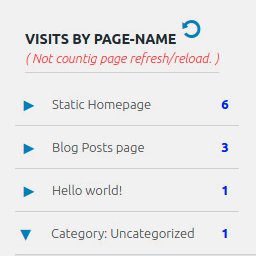
Page Visits Counter – Lite
This plugin is going to display the number of visits for each page in the:
- Admin dashboard
- Browser developer-tools/console tab – (HIDDEN COUNTERS)
- Website/page frontend – (OPTIONAL)
You can add and display counters on the frontend of your website:
- total page-visits-counter and/or
- total website-visits-counter
( Page-visits-counter does not count page refresh as a new visit while Website-visits-counter counts everything. )
Hidden page counter + admin page reports
How to display hidden counter on a website frontend?
The purpose of this plugin is to supplement the report of actual visits to the pages of the website that cannot be recorded through advanced analytical tools. Advanced analytical tools require the consent of a visitor before the visit is recorded.
WHY LITE?
- It is a small size software and it does not require much memory.
- It is not going to crowd your database with tons of metric data and “eat” database memory.
- It is not going to collect user’s personal data – GDPR compliant.
NOT COUNTING
- Logged in user with a role:
- admin
- editor
- shop manager
- custom role
- Page refresh/reload ( But “Total Visits” load&reload sum will count it. )
- Submitting comments ( But “Total Visits” load&reload sum will count it. )
- Visiting direct media link in the uploads folder
- Media – attachment page
- Search results page
- Update cart ( But “Total Visits” load&reload sum will count it. )
- Checkout/order received ( But “Total Visits” load&reload sum will count it. )
COUNTING
- A visitor ( Not logged in )
- Logged in user with a role:
- Subscriber
- Author
- Contributor
- Pending_user
- Customer
- Pages and posts:
- Pages and subpages
- Default and Static Homepage
- Blog Posts page
- Single post
- Default category and tag – archive pages
- 404
- CPT
- Taxonomy archive pages
- WooCommerce:
- SHOP – archive page
- Single product
- Default category and tag – archive pages
- Attribute archive pages
- Cart ( Check Update cart is not counting… )
- Checkout ( Check “Checkout/order received” is not counting…)
ON CHANGE NAME of Page, Post, Product…
If you change the name of an existing page, post, product, archive, etc. then the old page will remain intact in the page visits report.
After a new visit, the new page name will appear in the page visits report and the counter will start counting visits for the new page from the start.
ON DELETE of Page, Post, Product…
If you delete an existing page, post, product, archive, etc. then the page will remain intact in the page visits report including its number of visits.
VISITS-COUNTER ON THE WEBSITE FRONTEND
There are two counter types:
- Website counter
- Page counter ( Not counting page refresh. )
You can add one or both counter types on your website or page frontend.
Instructions on how to add counter/s to your website are in the plugin settings page under the tab named counter.
FEATURES
- Invisible counter (In browser Developer-tools / Console)
- GDPR Compliant
- WooCommerce (HPOS and Remote Logging) compatible
REQUIREMENTS
- WordPress 5.0 +
- PHP 5.6.40 +
- WooCommerce 4.9.2 +
PLUGIN UNINSTALL
On the plugin delete/uninstall it will automatically clean its data from the database unless you select to preserve them in the plugin settings area.
Therefore, it is harmless for you to try out this plugin.
FOR DEVELOPER
Admin dashboard widget has four wp-hooks:
- add_action( ‘StrCPVisits_db_widget_wrapper_start’ );
- add_action( ‘StrCPVisits_db_widget_after_total_visits_boxes’ );
- add_action( ‘StrCPVisits_db_widget_wrapper_end_before_js’ );
- add_action( ‘StrCPVisits_db_widget_wrapper_end_after_js’ );
LEGAL
2 months agoTested with 6.9.45,000+ active installationsDenis Botić4.0(7)
Simple Analytics
Simple Analytics gives you the analytics you need without invading the privacy of your users, with a clean interface and simple integration.
- Privacy-friendly by design: Simple Analytics is built with privacy in mind. Get the insights you need while respecting your users’ privacy.
- Simple interface: Google Analytics is a monstrosity of custom dashboards and features. At Simple Analytics, we provide the insights you need in a clear and straightforward interface.
- No cookiebanner required. Simple Analytics does not use cookies or any other identifiers, meaning you don’t need to add an annoying cookiebanner to your website. You can use Simple Analytics without the need for consent.
- GDPR-compliant. Simple Analytics is GDPR-compliant and out-of-the-box since we don’t collect, store, or process personally identifiable information.
- Easy integration. Simple Analytics is easy to install. You can use our WordPress plugin to get started right away. It’s also possible to import your historical Google Analytics traffic so you don’t lose any data switching to Simple Analytics.
- It’s free. Simple Analytics has a free option to get started. There is a 14-day free trial to explore our paid features. However, you can use Simple Analytics for free forever if you like.
Check our live demo
Simple Analytics is entirely self-funded and proudly supported by our 18500+ users. We don’t sell your data, we don’t do ads, and we don’t have investors that tell us what to do. We’re here to build a product that you love.
Use it for free as long as you need, or if you’re happy, consider one of our paid options for more features and more data history.
Features
Events
– Event Tracking: Monitor specific user interactions that are not captured by standard page views, such as button clicks, form submissions, or video plays.
Goals
– Goal Tracking: Set specific goals to monitor user interactions on your website, such as conversions or engagement metrics.
– Goal Cards: Visual representations of your goals that allow for quick performance assessments.
– Custom Filters: Create filters to refine the data associated with each goal, making it easier to analyze specific user behaviors.
Ai Analytics
– Chat with your analytics to generate custom insights and dashboards.
Custom Views
– Permanent Filters: Establish permanent filters on your dashboard to focus on specific data sets.
– Multi-Domain Merging: Combine data from multiple domains into a single dashboard for a comprehensive overview.
– Access Control: Share limited views of your analytics data with team members or stakeholders.
Filters
– Data Filtering: Apply filters to exclude certain traffic sources or user behaviors, allowing for cleaner, more relevant data analysis.
Export Your Data
– Data Export Options: Easily export your analytics data in various formats for further analysis or reporting.
Import Google Analytics Data
– Data Migration: Import historical data from Google Analytics to maintain continuity in your analytics tracking.
Email Reports
– Automated Reporting: Set up automated email reports to receive regular updates on your website’s performance metrics.
Bypass Ad-Blockers
– Ad-Blocker Resilience: The tracking script is designed to bypass common ad-blockers, ensuring that you capture more accurate visitor data.
Robot Blocking
– Bot Traffic Management: Automatically block known bots from skewing your analytics data, leading to more reliable insights.
Hide Referral SPAM
– Spam Filtering: Filter out referral spam to ensure that your analytics data reflects genuine user interactions.
Embed Chart on Your Site
– Data Visualization: Embed analytics charts directly on your website for live data displays, enhancing transparency.
Trend Lines
– Performance Tracking: Utilize trend lines in your analytics to visualize performance over time, aiding in identifying patterns and forecasting.
Annotations
– Event Marking: Add annotations to your data to mark significant events or changes, providing context for fluctuations in your analytics.
Block Your Visits Extension
– Personal Visit Exclusion: Use an extension to block your own visits from being tracked, ensuring that your analytics reflect genuine user activity.
iOS App
– Mobile Access: Access your analytics data on the go with a dedicated iOS app, allowing for real-time insights wherever you are.
A week agoTested with 7.01,000+ active installationsAdriaan5.0(3)
Google Analytics Opt-Out
This plugin provides opt-out functionality for Google Analytics by setting a cookie that prevents analytics.js or gtag.js from collecting data. The new GDPR rules require an opt-out.
Works perfectly with the [Google Analytics by MonsterInsights Plugin] (https://wordpress.org/plugins/google-analytics-for-wordpress/ “Google Analytics by MonsterInsights Plugin”). However, the plugin is not required to configure the opt-out feature. Just enter your UA or GA code manually. And that’s it!
The free and pro versions have now been merged. So now you can also activate a banner! Have fun with it!
2 years agoTested with 6.2.95,000+ active installationswp-buddy4.5(16)
Trackboxx Analytics
****GDPR-compliant web analytics without cookies!****
Analyze and evaluate the visitor statistics of your website – simply and 100% GDPR compliant.
Trackboxx – Visitor tracking Made in Germany.
👉 Check out our live demo OR sign up for a free 30-day trial
You need a subscription to Trackboxx Analytics to track your stats. There’s a free 30-day trial with no credit card required.
Note: With our “Free Plan,” you can use Trackboxx 100% free – up to 2,500 pageviews a month with limited features. Our paid plans start at €5/month. Use the 30-day free trial with unlimited usage without the need for a credit card.
Why Use Trackboxx?
Navigating Google Analytics can be cumbersome, perplexing, laggy, and invasive in terms of privacy. Here’s where Trackboxx Analytics steps in – a streamlined, potent, feather-light, open-source, and privacy-conscious solution. Here’s why Trackboxx stands out as an outstanding alternative to Google Analytics:
Third-Party Service Terms
Before using this plugin, it is recommended to review the terms of use and privacy policies of the Trackboxx service:
By using this plugin, you acknowledge and agree to the terms and policies of the third-party service.
Note: This documentation is provided for legal protection, ensuring that users are informed about the integration with third-party services. Please keep this information up to date to reflect any changes in service usage or associated terms.
Why Trackboxx
Privacy-first analytics for WordPress site owners and shop operators. 100% SaaS (not self-hosted) with a quick setup via plugin or code snippet. Start on the free plan or use our 30-day Trial with no credt Card required. Upgrade anytime for advanced features.
Simple Insights, Not Overwhelm
Clear live dashboard with page and landing-page reports—no complex menus or custom report building required.
E-Commerce Tracking
Full online shop analytics: sales, orders, revenue, average order value, and conversion rates. Track cart and checkout funnels, including cart abandonment. Works great with WooCommerce; more platforms via integrations.
Privacy & Compliance
Anonymous measurement by design—no cookies and no consent banners required. GDPR-friendly data handling with data minimization.
Performance
Lightweight tracking script that keeps your site fast and responsive.
Campaigns, Goals & Segments
Set up goals in minutes and track marketing campaigns (e.g., UTM). Break down performance by traffic sources, content, device, and more.
Team & Sharing
Invite team members, assign user roles, and share read-only views securely.
WordPress Integration
Automatic insertion of the tracking code in your site’s header. Clean settings page with clear options. View Trackboxx stats directly in your WordPress dashboard. Opt-out option for visitors included.
Getting Started
Install the plugin, connect your Trackboxx site ID, and you’re ready to go—start free, upgrade when you need more.
Additional Features:
- Easy onboarding
- Automatically includes tracking code in the header of your site
- Simple plugin settings page with clear options
- View your Trackboxx stats directly in your WordPress dashboard
- OptOut Option
- Activation of e-commerce options (coming soon)
- Set up goals
Setting up this WordPress Plugin
External services
This plugin communicates with two external domains operated by Trackboxx:
-
Script loading (
cdn.trackboxx.info) – When a page on your site loads, the Trackboxx tracking script is downloaded fromhttps://cdn.trackboxx.info/p/tracker.js. This request retrieves the JavaScript file and does not transmit any visitor data beyond the standard HTTP request for the script. -
Event endpoint (
hit.trackboxx.info) – After the script is loaded, anonymised visit data and e‑commerce events are sent tohttps://hit.trackboxx.info/hit-action. The payload includes the current page URL, referrer, your Trackboxx site ID and any WooCommerce events (product names, values, coupons, etc.). IP addresses are anonymised before being transmitted. This endpoint is contacted on each page view and whenever tracked WooCommerce events occur.
Terms of Service: Trackboxx Terms of Use
Privacy Policy: Trackboxx Privacy Policy
6 days agoTested with 7.080+ active installationsChristian0.0(0)
Page Visit Counter Analytics – Google Analytics Alternative for WordPress
Page Visit Counter Analytics is a lightweight, privacy-first analytics plugin for WordPress. Track visitor sessions, analyze top pages, measure bounce rate, monitor traffic sources, and view real-time stats—right inside your WordPress dashboard.
Unlike bloated analytics tools, this plugin is built for speed and compliance. No cookies. No tracking pixels. Just clean, powerful insights from your WordPress site—without slowing it down.
Perfect for bloggers, marketers, WooCommerce stores, and anyone who wants actionable analytics without relying on Google Analytics or external services.
Get more WordPress tools — Check out the PluginStack Bundle: AI, WooCommerce, Gravity Forms, Analytics & more. All current + upcoming plugins. One-time payment, no subscription.
🔥 Why Choose Page Visit Counter Analytics?
– Built for privacy – no cookies, no PII, fully GDPR/CCPA-ready
– Real-time visitor stats and session analytics
– Track page views, bounce rate, session duration, and pages per session
– UTM campaign tracking with full summary and source grouping
– Goal tracking & conversion analytics (Pro)
– Lightweight: No impact on site speed
– 100% self-hosted, no 3rd-party servers or APIs
Features
- 📊 Visitor Analytics: View daily visits, top pages, devices, browsers, and countries
- ⚡ Real-Time Stats: See who’s visiting your site right now
- 🔍 Traffic Sources: Discover how visitors find your site (referrers, UTM, direct)
- 🎯 Campaign Tracking: Full UTM support to track marketing efforts (Pro)
- 🧭 Session-Level Insights: Track session duration, bounce rate, pages/session
- ✅ Goal Completions: Set and monitor conversion goals (Pro)
- 🔥 Click Heatmaps: Visualize visitor clicks on each page (Pro)
- 🔒 Privacy First: No cookies, fully compliant with privacy laws
- 🚀 Fast & Lightweight: Zero impact on page load times
- 🧩 Easy to Use: No configuration needed. Just activate and get insights instantly.
Migration from Advanced Page Visit Counter
If you’re upgrading from Advanced Page Visit Counter, your data will be automatically migrated to Page Visit Counter Analytics. The migration process:
- Preserves all your existing page visit data
- Maintains historical analytics
- Transfers your settings and configurations
- Keeps your custom tracking rules
The migration happens automatically when you activate Page Visit Counter Analytics. No manual steps required!
Migration from Advanced Page Visit Counter
If you’re switching from Advanced Page Visit Counter, here’s what you need to know:
-
Data Migration
- Your existing visit counts will be automatically migrated
- Historical data will be preserved
- No manual data transfer needed
-
Key Differences
- Enhanced privacy features
- Improved performance
- More detailed analytics
- Better dashboard interface
- No cookie dependency
-
Migration Steps
- Install and activate Page Visit Counter Analytics
- Deactivate Advanced Page Visit Counter
- Your data will be automatically migrated
- Visit the new dashboard to verify the migration
-
Post-Migration
- Review your settings in the new plugin
- Update any custom shortcodes if used
- Check your analytics dashboard for data accuracy
4 months agoTested with 6.9.4100+ active installationsAnkit Panchal0.0(0)
Pirsch Analytics
Pirsch is a simple, privacy-friendly, open-source web analytics tool. It’s lightweight, cookie-free and easily integrates into your WordPress installation, without using JavaScript. It does not collect data that can be uniquely assigned to a user, but instead shows aggregated statistics. Find out more here on how that works.
Terms and Conditions, Privacy Policy
Please refer to our website for our terms and conditions and privacy policy. Responsible for this plugin is Emvi Software GmbH.
8 months agoTested with 6.8.5200+ active installationsMarvin Blum5.0(1)If it doesn't, we'd be happy to build it for you - just reach out to Sirvelia for custom solutions!